
Online Cleanout Deposits
In This Article:
- What Is a Cleanout Deposit?
- What Is an Online Cleanout Deposit?
- Why Is an Online Cleanout Deposit Better for Bidders?
- How Will I Know if a Unit I'm Bidding On Requires an Online Cleanout Deposit?
- When Will My Deposit Be Charged?
- What Is a CDM PIN?
- When Will My Deposit Be Refunded?
- What Is the Cleanout Deposit Guarantee?
1. What Is a Cleanout Deposit?
Cleanout deposits are an amount that's charged and held by the storage facility operator. They are used to enforce the requirement to fully clean out the unit, and leave no goods behind.
The cleanout deposit is refunded once the seller determines the unit has been fully cleaned out. Leaving goods behind and sacrificing the cleanout deposit is not allowed and will result in a bidding suspension.
2. What Is an Online Cleanout Deposit?
Online Cleanout Deposits are charged and refunded through Lockerfox, instead of through the storage facility's payment processor or by using cash.
You'll need to have the card set up in your Lockerfox account or be ready to provide card information to the facility, so they can charge the cleanout deposit through Lockerfox.
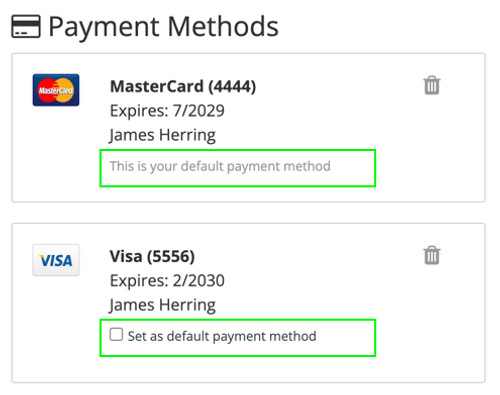
Lockerfox allows multiple credit/debit cards on your account. You'll set one as the default card for paying buyer's premiums. You can have other cards, which can be used to pay online cleanout deposits.
NOTE: To make the process easier, you can also give the seller a card number that is not linked to your Lockerfox account, if you prefer.
3. Why Is an Online Cleanout Deposit Better for Bidders?
Online Cleanout Deposits are better for bidders because:
- Eliminates issues with facilities taking too long to process refunds (See Cleanout Deposit Guarantee).
- Using a credit card (instead of a debit card) means you don't tie up money on a cleanout deposit, just float it on the card until it's refunded.
- Useful when a facility has a distant annex location and the winner would otherwise need to return later to collect their cash cleanout deposit.
- Gets rid of issues where a facility deposits a cash cleanout deposit as part of their nightly cash bank deposit and then needs to refund via paper check.
- If the facility takes a cash cleanout deposit and allows after-hours cleanout, you might need to make a trip back to the facility the next day to get your deposit back. Online deposits save you time & money.
Handling of cleanout deposits has become more of a problem with the growing trend of remotely managed facilities and facilities going cashless and needing to charge cleanout deposits within their facility management software which don't always make it easy to charge and refund the amounts.
Managing them online within Lockerfox helps make the process easier for everyone.
4. How Will I Know if a Unit I'm Bidding On Requires an Online Cleanout Deposit?
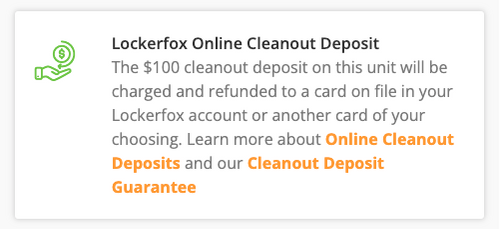
Lockerfox will show an information box if the facility is taking cleanout deposits through Lockerfox:
5. When Will My Deposit Be Charged?
The facility will charge the cleanout deposit through Lockerfox at the time you pay them for the unit.
The Cleanout Deposit is not charged when the unit ends, like happens with the buyer's premium.
Please be sure to have a card for the deposit either already set up in your Lockerfox account or at hand when you are calling the facility to pay (if remotely managed) or when visiting the facility to pay for the unit.
6. What Is a CDM PIN?
When you pay for the unit, the facility owner or operator will ask for your 4-digit CDM PIN to authorize the cleanout deposit charge.
Each unit you win has its own unique CDM PIN. This 4-digit PIN authorizes the facility to charge the cleanout deposit to the payment card saved in your Lockerfox account.
You will get the CDM PIN by email and text when you win a unit.
You can also use a credit or debit card that isn't saved in your Lockerfox account. If you do, you won't need to provide the CDM PIN.
7. When Will My Deposit Be Refunded?
The facility will refund the cleanout deposit once they verify the unit is completely emptied.
In some cases, the charge may disappear from your account quickly, even the same day if it's being handled as a hold. In other cases, it may take a few days. Unfortunately, we cannot control how quickly the payment processing systems complete the refund and you see funds back in your account.
We recommend using a credit card so you're not tying up useful funds.
8. What Is the Cleanout Deposit Guarantee?
If a facility does not refund your deposit, or choose to keep it due to failure to cleanout, the Lockerfox system will automatically refund it after 15 days.
The 15 day waiting period is to allow the facility, and in particular remotely managed facilities, adequate time for a field tech to visit the property and verify cleanout.
The upside of this feature is that if a facility takes too long to resolve your cleanout deposit, the system will refund it back to you automatically. It solved one of the bigger buyer complaints regarding cleanout deposits... having to track down and chase a refund.
We recommend using a credit card so you're not tying up useful funds.
